Challenger Comics Viewer
- 3.8
- Rating
- 1.00M
- Installs
- Free
- Price
 Analysis by App-foxy
I like comic apps that stay out of the way. My priority is usually simple: open a file, make the page comfortable to read, and avoid converting or reorganizing my collection first. Challenger Comics Viewer takes that practical approach. It is a free comics app from The Challenger, aimed at readers who already keep digital comics as files rather than relying entirely on an online catalog.
The central capability is broad file support. The app can read PDF, ePUB, CBR, CBZ, CBT, CB7, JPG, PNG, BMP, and GIF files. That matters more than it may sound. A collection built over time often contains several formats, especially when books come from different sources or have been archived on different devices. Instead of maintaining a separate reader for each type, I can use one place to open them.
That flexibility is the reason I would recommend trying it before searching for a more elaborate comics platform. It is not primarily about discovering new series or managing a subscription library. It is about turning an existing folder of comics and image files into something I can read on an Android device. The distinction is important because it immediately tells me who will enjoy it and who may find it too plain.
You May Also Like

 Pandora - Music & Podcasts
Pandora’s Music Is Easy to Start, but Harder to Recover
Pandora’s strength is its low-effort path from a seed to a station. Its weak spot is how much confidence it asks you to place in connection, setup, and quiet recovery.

 AccuWeather: Weather Radar
AccuWeather Review: A Quick, Clear Forecast for Everyday Decisions
For everyday plans, the best forecast is the one you can understand quickly. AccuWeather makes rain timing, radar, and local conditions easy to act on, with a few trade-offs.

 Hill Climb Racing
Why Hill Climb Racing Still Turns Crashes Into One More Run
A tiny car, a bumpy hill and one more upgrade: Hill Climb Racing keeps resurfacing because its simple chaos makes every near-miss feel personal.

 AliExpress - Shopping App
AliExpress Makes Global Shopping Feel Personal, but Shoppers Bear the Risk
AliExpress turns a global marketplace into a pocket-sized discovery engine. Its reach is useful, its shopping loop compelling, and its trade-offs easy to miss.

 Lords Mobile: Kingdom Wars
Lords Mobile Is a Kingdom-Building Routine, Not a Quick Match
A case-by-case verdict on the building, battles, device demands, and social commitments that make Lords Mobile rewarding for some players and exhausting for others.

 PDF Scanner app - TapScanner
TapScanner Makes Paperwork Easier to Capture, Check, and Share
TapScanner makes scanning with a phone feel less like a rescue operation and more like a dependable step in getting work done. Its capture tools are useful, though not flawless.
More From Our News Desk
View All News


One viewer for a mixed comic collection
I find that a mixed collection is easiest to enjoy when I choose a few books before I leave, rather than treating the viewer as a place to sort everything on the fly. That small habit also helps me notice which formats and page layouts suit my device best. Next, I look at how connectivity affects the moments around reading, without assuming the same conditions for every file or setup.
Why format support changes the reading routine
In everyday use, the strongest feature is not just the number of formats listed. It is the reduction in small obstacles. A CBZ archive, a PDF graphic novel, and a folder of scanned JPG pages can otherwise require different apps or a little preparation before reading. With this viewer, the same reading habit can cover all of them.
I find that especially useful when moving between a desktop archive and a phone or tablet. Rather than unpacking every image-based comic and rebuilding it as a PDF, I can leave the archive in its existing form. That saves time and also preserves the original organization of the collection. For readers who have accumulated comics gradually, this is more valuable than a decorative interface or a recommendation feed.
The support for ePUB is also worth noting because it broadens the app beyond the familiar comic archive extensions. Meanwhile, the ability to open ordinary image formats makes it suitable for individual pages, personal scans, preview images, or a comic saved as a simple sequence of pictures. The practical trade-off is that file support does not automatically make every source equally pleasant to read. Page quality, proportions, and the way a file was assembled still affect the experience.
What happens when I open a file
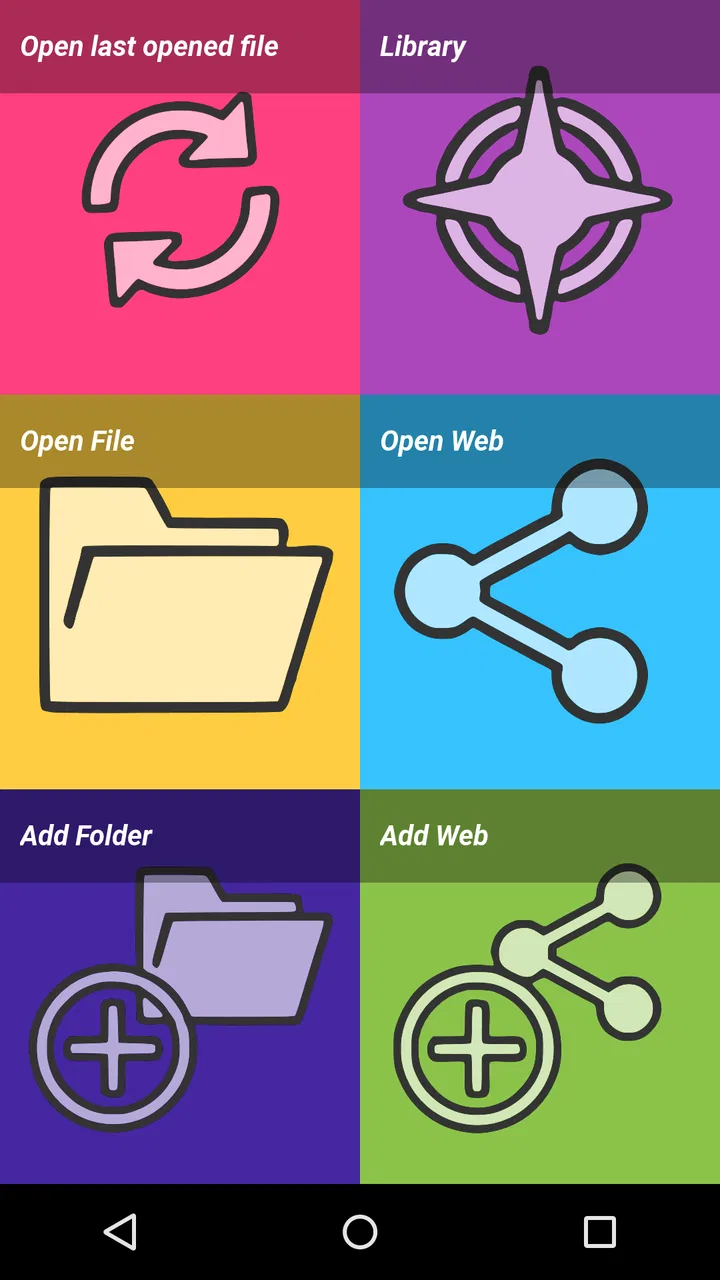
The best way to think about the app is as a reader for material I already own or have stored locally. I choose a compatible file, open it, and start moving through the pages. That straightforward workflow is less glamorous than a full comics service, but it is also less dependent on a particular catalog or account. If my goal is to read a downloaded book during a commute or at home, that directness is useful.
For image-based archives, the file format itself becomes part of the experience. A CBZ or CBR collection may contain pages in a deliberate order, while a directory of JPG or PNG files depends more heavily on sensible filenames and sorting. I would therefore prepare a large collection before a long reading session: use consistent names, keep one book’s pages together, and avoid mixing unrelated images in the same folder. That small bit of housekeeping prevents confusion later.
PDF files can be convenient when a complete book is already packaged that way, but they may behave differently from a purpose-built comic archive. A PDF can include pages with varied dimensions, covers, or extra material. I would not judge the viewer solely by one unusually formatted file. Testing a few representative books—one archive, one PDF, and one image sequence—gives a more honest idea of how well it fits a personal library.
A realistic reading scenario
Imagine that I am leaving home with a tablet and want to continue a graphic novel without carrying paper copies. One book is stored as a CBZ archive, another as a PDF, and a handful of short strips are individual PNG files. A format-focused viewer lets me keep that small selection together instead of deciding which files are worth converting. I can read the archive, switch to the PDF when I want a different book, and open the image sequence without changing apps.
That scenario also shows the app’s main strength: convenience before sophistication. I am not asking it to recommend the next series, synchronize a reading position across several services, or replace a complete digital comics store. I am asking it to read files that are already available. For that job, broad compatibility has a direct effect on how much preparation I need to do.
Useful habits for larger libraries
When a collection grows, I would organize it outside the viewer as carefully as inside it. Separate folders by series or volume, keep covers with the corresponding files, and use filenames that place volumes in a clear order. This is particularly helpful with image folders, where a careless naming pattern can make pages appear in the wrong sequence. The app can open the content, but good organization remains the reader’s responsibility.
I would also avoid treating every supported extension as interchangeable. CBR, CBZ, CBT, and CB7 are archive-based formats with different packaging, while JPG, PNG, BMP, and GIF are individual image formats. A file may technically open yet still be awkward if its pages were exported poorly. For a clean experience, I prefer well-formed archives with one page per image and consistent page dimensions.
Another practical tip is to test a book before copying an entire collection to a device. A short sample can reveal whether the pages are readable at the screen size, whether the order looks correct, and whether the file itself has problems. This is a better workflow than discovering halfway through a trip that a large archive is badly assembled or difficult to navigate.
Where the app feels less complete
The same focused design that makes the viewer useful can make it feel limited beside modern comics ecosystems. Readers who want a built-in storefront, curated recommendations, publisher accounts, or a cloud-based library may prefer a service designed around those functions. This app makes more sense when the files are already in my possession and I want control over how I read them.
It is also not the ideal choice for someone who expects every part of a collection to be automatically arranged. File compatibility is not the same as library management. If I have hundreds of loosely named images and archives, I should expect to spend time sorting them. That is not a defect in opening comics, but it is an important distinction before installing it as a complete collection manager.
Screen size affects the decision too. A phone can be perfectly adequate for a quick strip or a page designed with large lettering, while a dense manga or full-page comic may be more comfortable on a larger display. The viewer can make a file available, but it cannot change the physical limits of a small screen. Readers who need elaborate panel-by-panel assistance may be happier with a more specialized alternative.
How it compares with the usual alternatives
Compared with a publisher’s app, this viewer is more neutral. A publisher platform may offer a smoother catalog and tightly integrated purchases, but it usually centers on that publisher’s ecosystem. Challenger Comics Viewer is more appealing when my library is mixed and stored in several file types. I give up some discovery and account-based convenience in exchange for broader control over local files.
Compared with a general document reader, it is a more natural fit for comics because its purpose is clearly centered on sequential visual reading. A document app may open a PDF, but it does not necessarily make a mixed comic collection feel coherent. On the other hand, someone who reads mostly text-heavy ePUB books and only occasionally opens a comic may prefer a broader e-book application with stronger book-management tools.
Compared with an image gallery, the dedicated viewer avoids making a comic feel like a pile of unrelated pictures. A gallery is fine for checking a single scan, but it becomes inconvenient when I want to read a complete sequence. The viewer’s value appears most clearly when pages belong together and I want to treat them as a book rather than browse them one at a time.
Who should install it
I think the best match is a reader with a local digital collection: archived comics, downloaded PDFs, scanned pages, or a mixture of these. It is also a sensible option for someone who dislikes converting files simply to make them readable on a mobile device. The free price lowers the barrier to testing it, and the Everyone content rating makes it broadly suitable from an age-classification perspective.
The app has been available since December 12, 2011, and its long presence helps explain why it feels like a practical utility rather than a trend-driven reading service. It supports Android devices running version 5.0 or later, so compatibility with an older phone or tablet is part of its appeal. I would still check the device’s available space before transferring a large library, since comic archives can become sizeable even when the reader itself is lightweight.
The app has passed one million installs, with an average rating of 3.9 from around twenty-two thousand ratings. I read that as a sign of a useful but not universally perfect tool: enough people find its approach worthwhile, while the score suggests that personal expectations and file collections will strongly influence satisfaction. The number of written reviews is around seven hundred, which gives the app a substantial public track record without turning the rating into a guarantee.
Questions I would settle before choosing it
If I am wondering whether it can handle a particular collection, the practical answer is to look at the extension first. PDF, ePUB, CBR, CBZ, CBT, CB7, JPG, PNG, BMP, and GIF are the formats it is built to read. For an unusual file, I would make a copy and test it rather than converting the whole library immediately. That approach protects the original archive and quickly reveals whether the file’s internal structure is sensible.
If I am asking whether it works without a subscription, the app’s free price is reassuring, but the important question is what I expect from it. It is a local file viewer, not a promise of access to a commercial comics catalog. I would use it with files I have legitimately obtained and stored on the device, then choose a dedicated store or publisher service if I want integrated purchasing and discovery.
If I am choosing between a phone and a tablet, I would base the decision on the page design rather than the app alone. Large lettering and simple layouts can work well on a phone. Detailed pages, small speech bubbles, and scanned material are more comfortable on a larger screen. A quick test with the densest book in my collection is more informative than judging from a short comic with generous text.
If I am concerned about managing a big library, I would treat folder structure and filenames as part of the setup. The viewer solves the reading-format problem, not every cataloging problem. A tidy series-and-volume arrangement makes it much easier to continue reading later, especially when the collection includes both archives and loose image files.
My recommendation after using its core idea
I would choose Challenger Comics Viewer when the main problem is variety: too many comic formats, too many separate folders, or too much unnecessary conversion. Its ability to read archives, documents, and common image files in one app has a tangible effect on my routine. I spend less time preparing files and more time reading them.
I would skip it if my priority is a polished discovery platform, automatic cloud organization, or a publisher-specific buying experience. Those needs call for a different kind of app. But for a personal, locally stored collection, its straightforward purpose is a strength rather than a weakness.
My final take: this is a practical free reader for people who value compatibility over spectacle. The most important tip is to test your real files, organize them clearly, and judge the experience on the screen you actually use. If that workflow matches your habits, the broad format support can make this modest-looking comics app surprisingly useful.
FAQs for Challenger Comics Viewer
01What platforms is Challenger Comics Viewer available on?
Challenger Comics Viewer is available for Android devices. It is designed to offer a seamless reading experience for comic book enthusiasts on smartphones and tablets. While it is not natively available for iOS, Android users can find it on the Google Play Store. Ensure your device meets the app's compatibility requirements before downloading.
02Does Challenger Comics Viewer support different file formats?
Yes, Challenger Comics Viewer supports a wide range of file formats, including CBR, CBZ, PDF, and more. This versatility allows users to enjoy a variety of comic book files without needing to convert them. The app's compatibility with multiple formats makes it a convenient choice for comic readers.
03Are there any customization features in Challenger Comics Viewer?
Challenger Comics Viewer offers several customization options to enhance your reading experience. Users can adjust the page layout, brightness, and orientation. Additionally, the app provides features like page scaling and zooming, allowing readers to tailor their viewing experience to personal preferences.
04Is Challenger Comics Viewer free to use?
Challenger Comics Viewer is free to download and use, with no mandatory in-app purchases. However, there may be optional features or ad-free experiences available through in-app purchases. Users can enjoy the core functionalities without spending money, making it an accessible option for comic book fans.
05How user-friendly is Challenger Comics Viewer for beginners?
Challenger Comics Viewer is designed with an intuitive interface, making it user-friendly even for beginners. The app provides easy navigation through its library and offers simple controls for reading comics. New users will find it straightforward to manage their comic collections and customize their reading experience.
Pros
- Supports multiple comic formats efficiently.
- Customizable display settings enhance reading.
- Smooth page transitions for immersive experience.
- Bookmark feature for easy access to favorites.
- Offline reading capability is a huge plus.
Cons
- No in-app tutorials for beginners.
- Limited cloud storage integration options.
- Occasional lag on older devices.
- Ads can be intrusive in free version.
- No option for collaborative reading or sharing.

Challenger Comics Viewer
Gallery